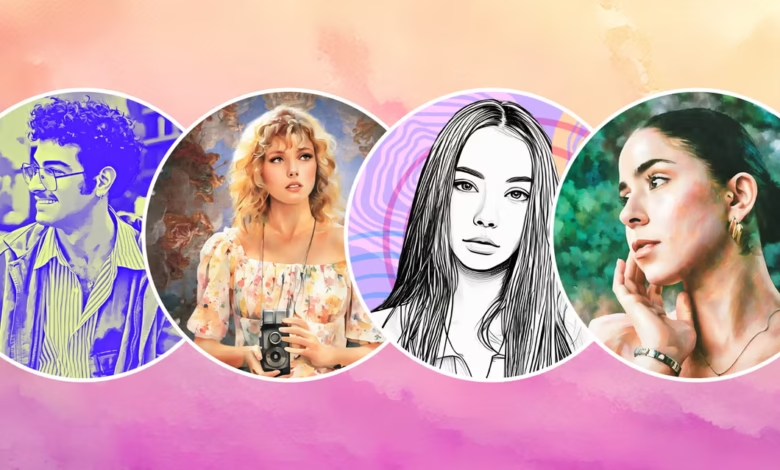
Creating the perfect profile picture has become more important than ever. Whether you’re updating your social media presence, improving your professional image, or simply wanting a fresh look, a good profile photo can make a real difference. It’s often the first thing people notice, sometimes even before they read your bio. That’s why many people now turn to smart online tools that make the process easier, faster, and more creative. Instead of spending hours clicking countless selfies or trying to edit manually, you can now design a polished, eye-catching profile picture in minutes. And that’s exactly where a reliable profile picture maker comes in.
In this article, we’ll explore how these tools work, the features that truly matter, and how you can use them to design a profile picture that perfectly represents your personality, style, or professional identity. Whether you’re a student, influencer, freelancer, or business owner, this guide will help you create a look you’re proud to show the world.
Why a Great Profile Picture Matters More Than You Think
A profile picture isn’t just an image, it’s a personal statement. It communicates confidence, personality, attitude, and even professionalism long before you say anything. In a digital world where first impressions happen in seconds, the right display photo can:
Build Trust Instantly
People tend to interact more with accounts that look real, approachable, and polished.
Strengthen Your Personal Brand
Whether you’re on LinkedIn, Instagram, or a portfolio site, a consistent and attractive profile picture makes your brand look put-together.
Boost Engagement
On social platforms, accounts with a clear, high-quality picture usually see better likes, comments, and follows.
Increase Professional Opportunities
A simple professional headshot can impress recruiters, clients, or collaborators.
Since most people don’t have access to professional cameras, lighting, or editing skills, using a smart profile picture maker is one of the easiest ways to get that perfect shot without the hassle.
What Is a Profile Picture Maker and How Does It Work?
A profile picture maker is an online tool or app that helps you create customized profile images using AI, templates, and editing features. Instead of manually adjusting brightness, background, or filters, these platforms automate the process and give you polished results within seconds.
How It Works:
- Upload your photo: any selfie or portrait will do.
- Choose a style or template: professional, casual, creative, artistic, gaming, corporate, etc.
- Customize: adjust lighting, remove background, add colors, filters, frames, or effects.
- Download your perfect profile picture.
What makes modern tools impressive is that they are smart enough to improve your features naturally, no awkward filters, no over-editing.
Top Reasons to Use a Profile Picture Maker
1. Saves Time and Effort
No need to learn Photoshop or wait for a photographer. You can design a polished DP in minutes.
2. AI Enhances Your Look Naturally
Modern tools improve sharpness, lighting, and skin tone while maintaining natural appearance.
3. Remove and Replace Backgrounds Easily
Want a clean white background for LinkedIn or a bold gradient for Instagram? Done with one click.
4. Wide Choice of Styles
Whether you prefer a professional corporate vibe or a fun, colorful aesthetic, you’ll find dozens of options.
5. Perfect for All Platforms
Most tools automatically size your photo for:
- TikTok
- YouTube
- Gaming profiles
6. No Special Skills Needed
If you can upload a picture, you can use a profile picture maker.
Must-Have Features in the Best Profile Picture Maker
When choosing the right tool, look for features that make your editing process smooth and the output high-quality.
1. High-Resolution Output
A great profile picture shouldn’t look blurry or pixelated. Choose a tool that provides HD downloads.
2. AI Face Enhancement
The tool should fix lighting, enhance clarity, and sharpen features automatically.
3. Background Removal and Replacement
One-click background editing is a must. Look for a platform with:
- Solid color backgrounds
- Professional office backgrounds
- Gradient effects
- Creative patterns
- Custom uploads
4. Style Presets and Templates
Templates save time and help maintain consistency, especially for business or creator branding.
5. Easy Customization Options
You should be able to adjust:
- Brightness
- Contrast
- Saturation
- Exposure
- Shadows
- Cropping
- Vignette
- Filters
6. Multiple Format Options
Support for JPEG, PNG, transparent PNG, and square or portrait sizes is extremely useful.
7. User-Friendly Interface
Even beginners should be able to edit easily.
How to Use a Profile Picture Maker to Create the Perfect Look
Here’s a simple step-by-step process to help you design a picture that genuinely represents your style.
Step 1: Pick a Great Base Photo
Start with a clear image where your face is visible and well-lit. You don’t need professional shots, just make sure:
- The background isn’t too busy
- The camera is steady
- Your face isn’t in shadow
Step 2: Upload It to a Reliable Profile Picture Maker
Choose a tool that offers AI enhancement and solid customization options. Uploading usually takes seconds.
Step 3: Select a Style
Depending on your purpose:
- LinkedIn: Go for a clean, professional background like white, grey, or office scenes.
- Instagram: Try colorful gradients, soft filters, or aesthetic tones.
- Gaming/YouTube: Bold colors, neon lights, or dramatic contrast styles work well.
- WhatsApp: Simple, clean, natural edits are often the best.
Step 4: Adjust Lighting and Effects
Use the enhancement features to:
- Brighten your face
- Improve sharpness
- Add subtle glow or shadow
- Soften edges if needed
Step 5: Choose the Perfect Background
This step can transform the entire mood of your photo. Try various styles until you find one that fits your personality or brand.
Step 6: Add Final Touches
You can add:
- Frames
- Borders
- Filters
- Color adjustments
Make sure the edits enhance your natural look, not overpower it.
Step 7: Download in HD
Always save the image in high resolution to maintain quality across platforms.
Who Can Benefit the Most from a Profile Picture Maker?
1. Students and Job Seekers
A clean, confident profile photo makes your resume and LinkedIn presence stronger.
2. Influencers and Content Creators
Your profile picture often becomes part of your brand identity.
3. Entrepreneurs and Professionals
A polished DP builds trust and credibility.
4. Gamers and Streamers
You can customize bold, dramatic styles that fit your gaming persona.
5. Social Media Users
Anyone wanting to refresh their online look will find these tools super useful.
Tips to Make Your Profile Picture Stand Out
Keep It Simple
Don’t overload your photo with effects. Clean and clear is always better.
Look Into the Camera
Eye contact builds connection instantly.
Use Soft, Even Lighting
Natural lighting works wonders; harsh shadows can distract.
Show a Natural Expression
A slight smile looks warm and inviting.
Keep the Background Clean
Whether solid or textured, it should highlight your face, not hide it.
Match Your Personality
Use colors and styles that reflect who you are.
Why the Right Tool Makes a Big Difference
Choosing the best profile picture maker ensures you get a professional-looking result without spending money on professional photography. With AI-powered enhancements and creative templates, you can transform a simple selfie into a polished portrait that stands out everywhere—from social media feeds to business platforms.
It also gives you creative freedom. Want something modern? Trendy? Minimalistic? Artistic? You’ll find endless possibilities that help express your personal style in a way that feels authentic.
Conclusion
Your profile picture is often the first impression you make online, and a great one can open doors, professionally, socially, and personally. Thanks to today’s advanced tools, you no longer need a fancy camera or editing skills to create a high-quality display photo. A good profile picture maker lets you design a clean, polished, and stylish image effortlessly, helping you present your best self on any platform.
If you’ve been thinking about upgrading your look, now is the perfect time. With the right tool and a bit of creativity, your perfect profile picture is just a few clicks away.